过程和思路
1.爬取的网站:某动态壁纸网站(http://wallpaper.upupoo.com/store/search--0-0-0-1.htm)
2.爬取的内容:视频
3.爬取方法:该网站视频没有将视频文件切割,采用HLS流媒体传输协议,而是直接返回视频整个文件,而且html里的可以找到视频文件的真实url,所以用request模块就可以爬取,思路如下:
- 获取html文件
- 用正则匹配出视频url,放到列表里
- 最后遍历列表下载保存
4.代码:
import re
import requests
import time
class Spider(object):
    def __init__(self):
        self.headers = {"User-Agent": "Mozilla/5.0 (Windows NT 10.0; WOW64; Trident /7.0;rv:11.0) like Gecko"}
        self.start_page = int(input('请输入抓取起始页【301-59998】:'))
        self.end_page = int(input('请输入抓取结束页【301-59998】:'))
        response = requests.get(url, headers=self.headers)
        data = response.content
        return data

    def save_html(self, data):
        file_path = 'html/' + "upupoo.html"
        with open(file_path, 'ab+') as f:
            html = f.write(data)
        return html

    def get_mp4(self):
        with open('html/' + "upupoo.html", 'rb') as f:
            html = f.read().decode('utf-8')
        re_mp4 = re.compile(r"http.*.mp4")
        mp4_list = re_mp4.findall(html)
        mp4_list = list(set(mp4_list))
        print('******接下来将会抓取【%d】个视频******' % len(mp4_list))

        filename = 1
        for mp4url in mp4_list:
            file_path = 'movie/' + "%d.mp4" % filename
            data = self.send_request(mp4url)
            with open(file_path, 'wb') as f:
                f.write(data)
            print('恭喜,%d.mp4 已抓取成功!' % filename)
            filename += 1

    def run(self):
        try:
            for page in range(self.start_page, self.end_page + 1):
                data = self.send_request('http://wallpaper.upupoo.com/store/paperDetail-18000' + '%05d' % page + '.htm')
                self.save_html(data)
            print('******Upupgo网站html已成功抓取******')
        except:
            pass
        self.get_mp4()

if name == 'main':
    start_time = time.time()
    Spider().run()
    end_time = time.time()
    final_time = end_time - start_time
    print('抓取用时{}秒'.format(final_time))
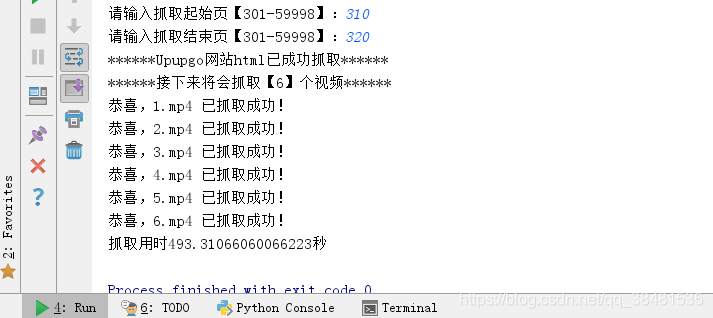
5.效果: